
This time we are going to learn how to create an account on Unlinked and upload all your favorite apps on Unlinked to share with your friends. Just follow the easy and simple steps to publish apps to the Unlinked library.
Steps to create an Unlinked account
The first thing to keep in mind is the following. You must have a Hosting and a Domain purchased so you can upload your applications or media. Wherever the Hosting or Domain is from it works the same. With this in mind let's go with the steps.
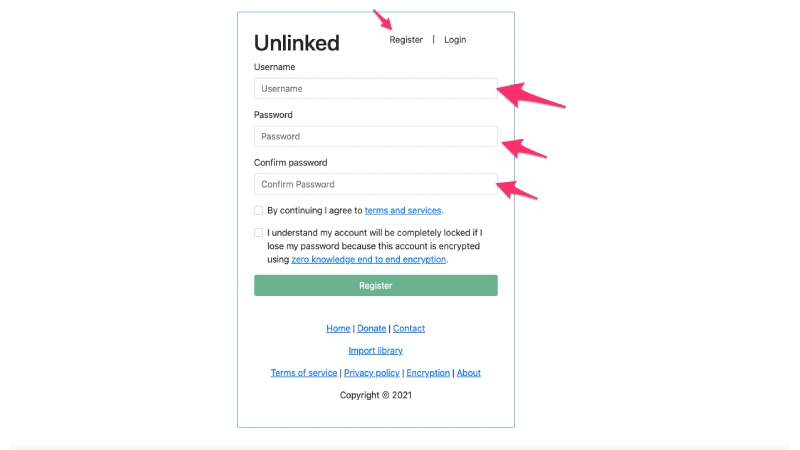
Guide to create an account on Unlinked
- Open Unlinked register
- Create your user, keep in mind that your password must be long and secure.
Guide to uploading files on Unlinked
- To upload your apks in Unlinked, you must have uploaded the apks and images in your Domain media to get the direct links and place them in Unlinked.
How to create an app library in Unlinked
- Now we will create a library of apps in Unlinked
- To create a library you must have already registered in Unlinked.
- Add a name to your library
- Add a description and a welcome message
- Now upload your apk + name + direct download link + apk logo Link
- Now you can share your library name with your friends.
- First you must download Unlinked on your device
How to download Unlinked on my Android TV or Android devices
Now I show you how you can download Unlinked, remember that Unlinked only works on devices with Android system. Devices like Roku are not Android system so you can not install on devices that have the Roku system.
- On your Android device you must install an app called “Downloader”.
- Open “Downloader” and enter this code: 234753
- Then it will start downloading and you will only need to install Unlinked.
- Open Unlinked and add your code or name to the library.
What is Unlinked for?
Unlinked is a very important application which we should have on our Android devices. Just by adding users or codes we will be able to enjoy many apps to unlock our Fire Stick, TV Box, MI TV Stick, Google TV, Android TV and other Android devices.
Relevant points
- Have hosting and domain to upload your Apks
- Create a user in Unlinked
- Create an app library
- Download Unlinked
It is of utmost importance to create an Unlinked account with real data, because if you forget your login password you will not be able to recover or reset your password.
Deja una respuesta
Entradas Relacionadas